For parents of children aged 5 to 11
This week's spellings, practised in ten minutes a day.
Type in the list that came home from school. Spelling Nest turns it into a short game your child plays on any phone, tablet or laptop, and tells you what has actually stuck.
Fourteen days free. Your card is taken at sign up, and if you cancel before day 14 you pay nothing at all.
Why it works
Not a spelling test. A week of small, useful practice.
Spelling Nest takes the spelling list your child brings home from school and turns it into a short daily game, for primary school children aged 5 to 11. Most spelling lists get a quick read on Sunday evening and a test on Friday. Spelling Nest spreads the same list across the week and keeps score of the only thing that matters: which words your child can now spell without help. You can see where your child is up to without sitting beside them, so by Thursday you know whether Friday is going to go well.
Spelling from sound, not copying
Copying a word off the page is easy to do and easy to forget. In Spelling Nest your child hears the word and builds it from letter tiles, which is much closer to what a test asks of them.
Mastered means mastered
A word only counts as mastered once it has been spelled from sound, first time, with no clues, on three different days. One lucky guess does not clear it off the list.
Help arrives before the tears do
If your child is stuck, Kit the owl replays the word slowly with each letter group lighting up, then offers the first letter, then the number of letters and the tricky part. Nobody sits there defeated.
How it works
Three steps, once a week.
A grown up adds the week's words
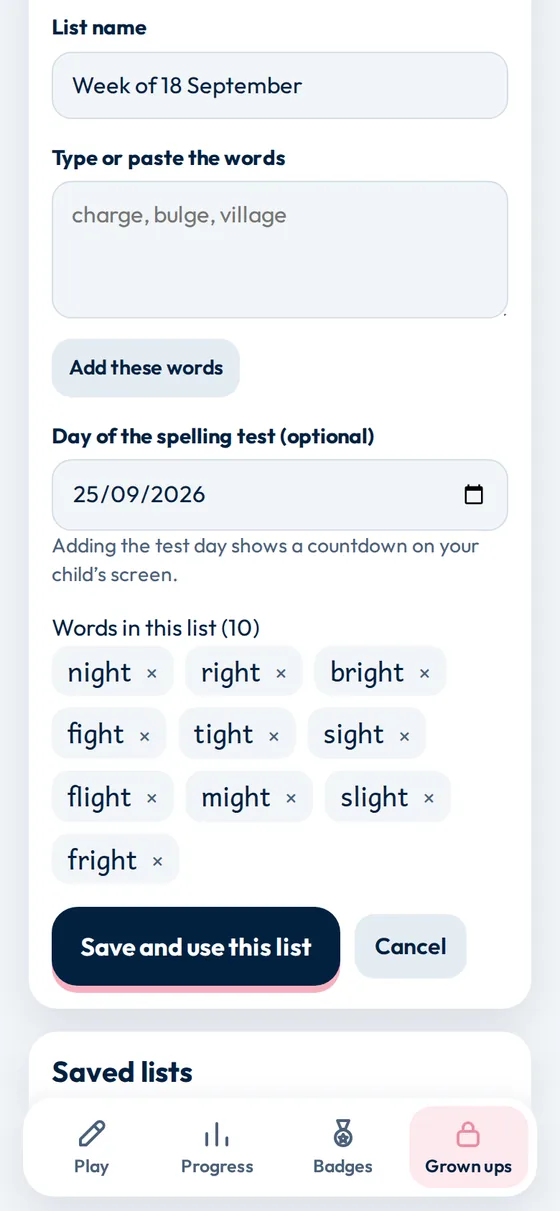
Type or paste the list that came home from school. Spelling Nest tidies it up, drops duplicates and shows each word as a chip you can remove. Add the day of the test and your child sees a friendly countdown.
- Any list works, because it is your school's list
- Saved lists can be reused, edited or deleted
- One account can hold several children, each with their own words and progress
Your child plays a short lesson
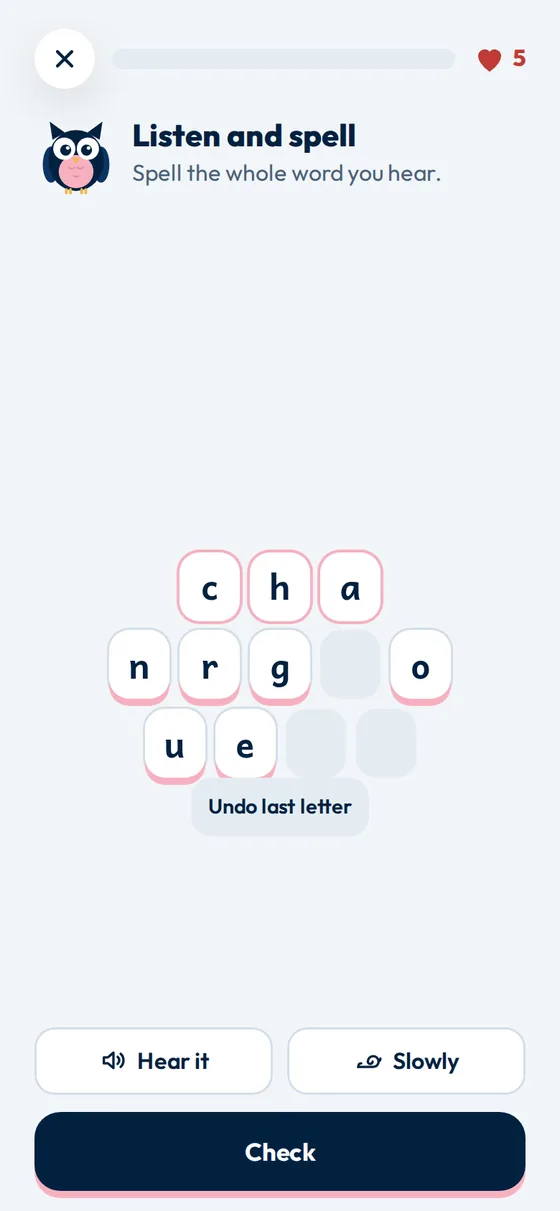
A lesson is six to twelve questions and usually takes under ten minutes. Every word comes up at least once, and the words that are not yet safe come up more often. Answers are always given by tapping letter tiles, so there is no keyboard to fight with.
- Five hearts a lesson, and a missed word returns later as a gentler question
- Hear it and Slowly buttons on every question
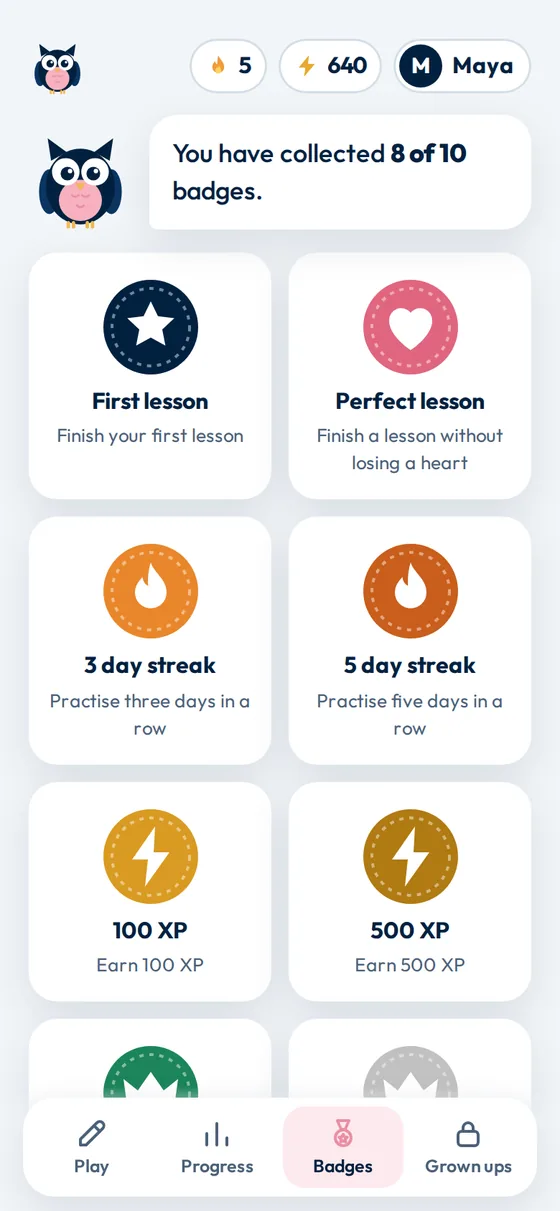
- XP, day streaks and ten badges to collect
You see what has stuck
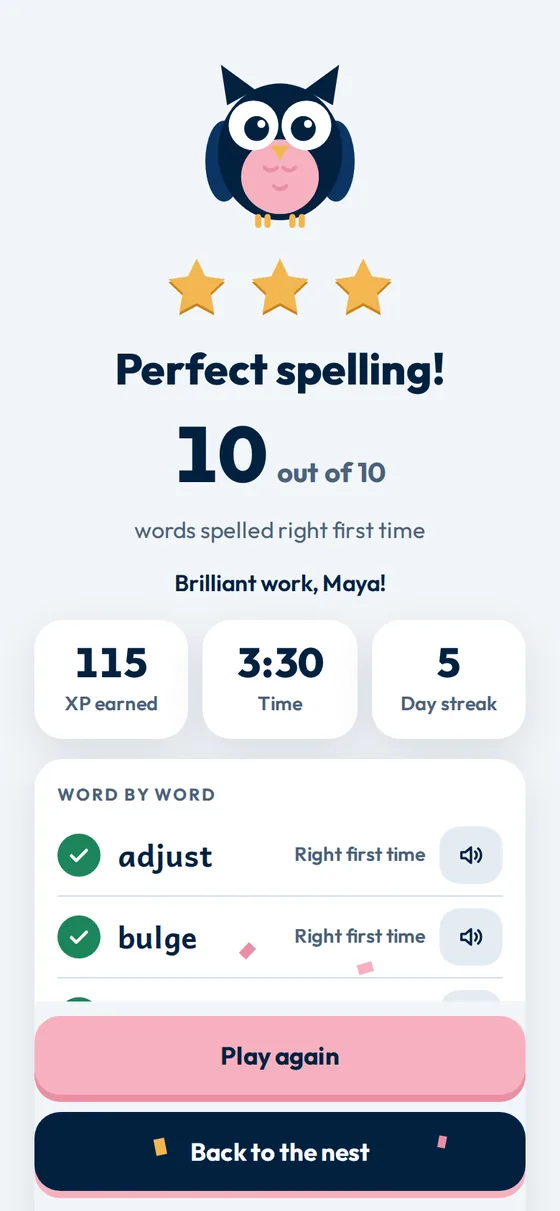
Every lesson ends with a scorecard: how many words were right first time, which ones need more work, and any words newly mastered. Progress keeps the week's streak, total XP and a word by word view, so Thursday evening is an informed conversation rather than a guess.
- Practise the tricky words in one tap
- Recent lessons kept with stars and scores
- Separate progress for each child
Ways to practise
Four ways to meet the same word.
Spelling Nest asks four kinds of question: unjumble, missing letters, look, cover, write, check, and listen and spell. Questions are mixed at random through the lesson, so the same ten words never feel like the same ten questions. Why four kinds rather than ten repetitions.
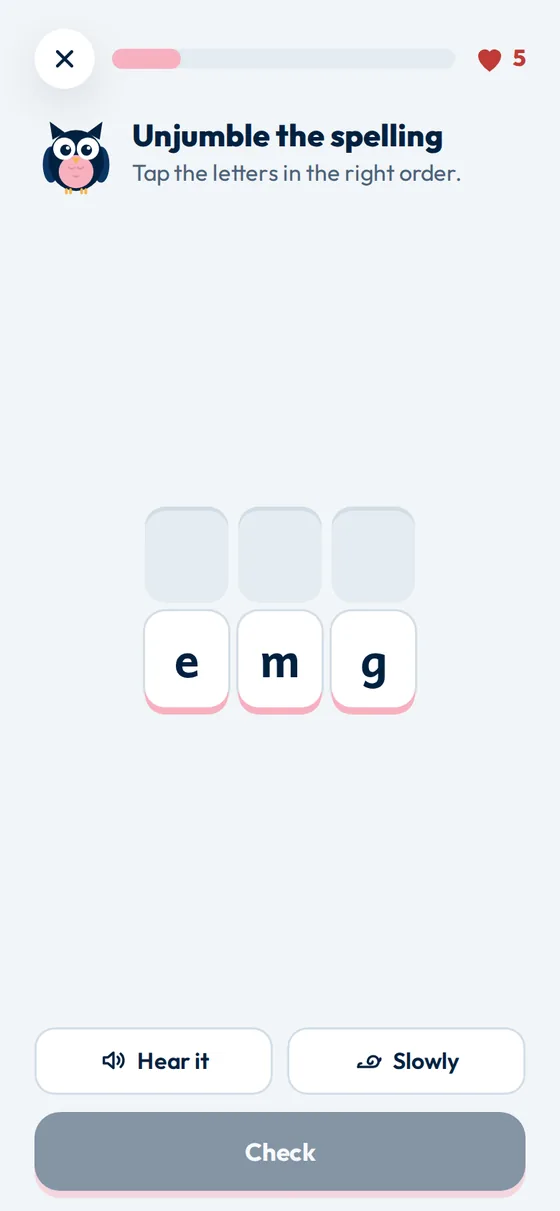
Unjumble
The letters are all there, in the wrong order. Good for noticing how a word is built.
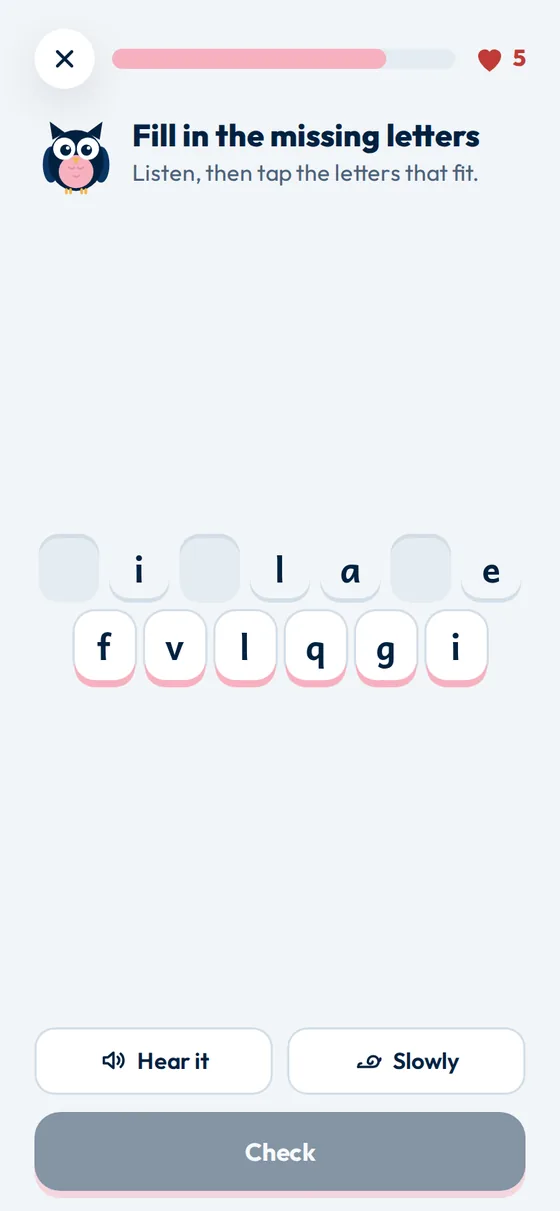
Missing letters
Most of the word is shown. The gaps fall on the parts that are easy to get wrong.
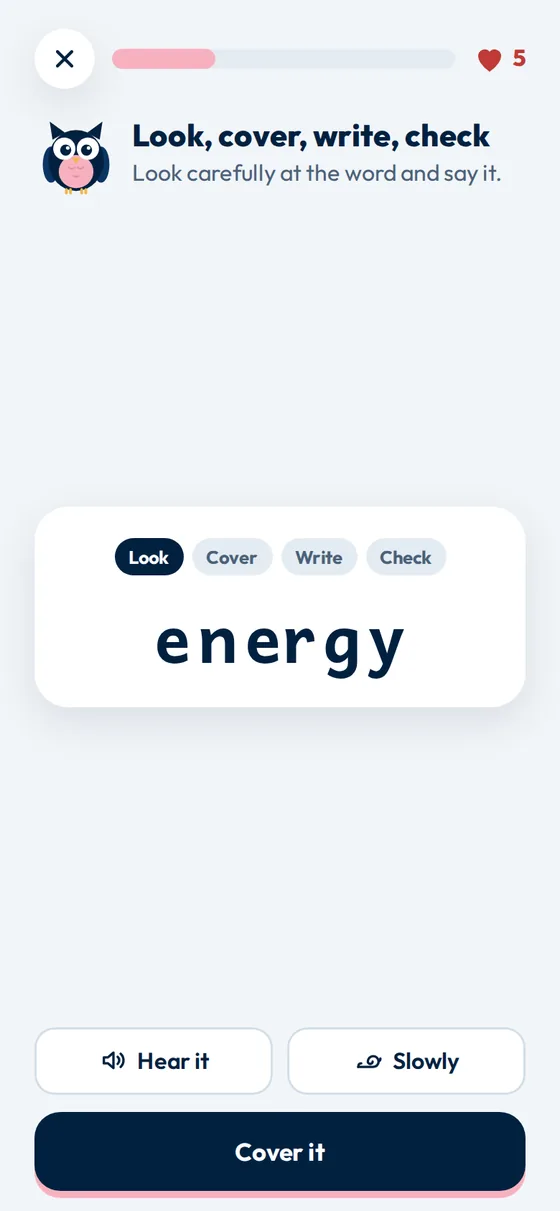
Look, cover, write, check
The classroom method, on screen. Look at the word, cover it, build it from memory, check.
Listen and spell
Nothing on screen but the tiles. This is the one that decides whether a word is mastered.
What it costs
Fourteen days free, then less than a coffee a month.
One price for your whole family, however many children you add. Your card is taken when you start so that practice carries on without interruption, and nothing is charged for fourteen days. Cancel before then and you pay nothing at all.
Monthly
£3 a month
Cancel any time, in no more steps than it took to subscribe.
Best value
Yearly
£20 a year
Save £16
That is twelve months for the price of about seven.
Competing spelling apps charge per child; this one price covers all of them.
From families using it
What changed at the kitchen table.
Comments from parents using Spelling Nest at home, published with their agreement.
My daughter was averaging around 5 out of 10 in her weekly spelling tests. Since we started using Spelling Nest, she's regularly getting 8 or more! She actually looks forward to practising now, and the ten minute games fit perfectly into our evening routine. No more battles over spellings!
Spelling practice used to be a real struggle in our house. Now my son asks to play his spelling game! I love that I can just add the words from his school list and Spelling Nest turns them into something he genuinely enjoys. It takes minutes to set up and keeps him engaged without me having to constantly remind him.
With work, clubs and everything else, finding time for spelling practice was always difficult. Spelling Nest has made it so much easier. We just pop in the week's spellings and spend ten minutes practising each day. I particularly like that it uses the familiar look, cover, write, check method, so we're reinforcing what they're learning at school.
The school run has become our spelling practice time! My daughter can play her spelling games in the car on the way to school, and it's such an easy way to fit learning into our busy mornings. No worksheets, no fuss, just ten minutes of practice before the school day even starts. She loves it!
My son absolutely loves collecting XP points and earning new badges! It's made spelling practice feel more like a game than homework. He's always keen to have another go and beat his previous score. It's lovely seeing him so motivated to practise his spellings without being asked!
Progress and rewards
Enough encouragement to keep going, not so much that it becomes the point.
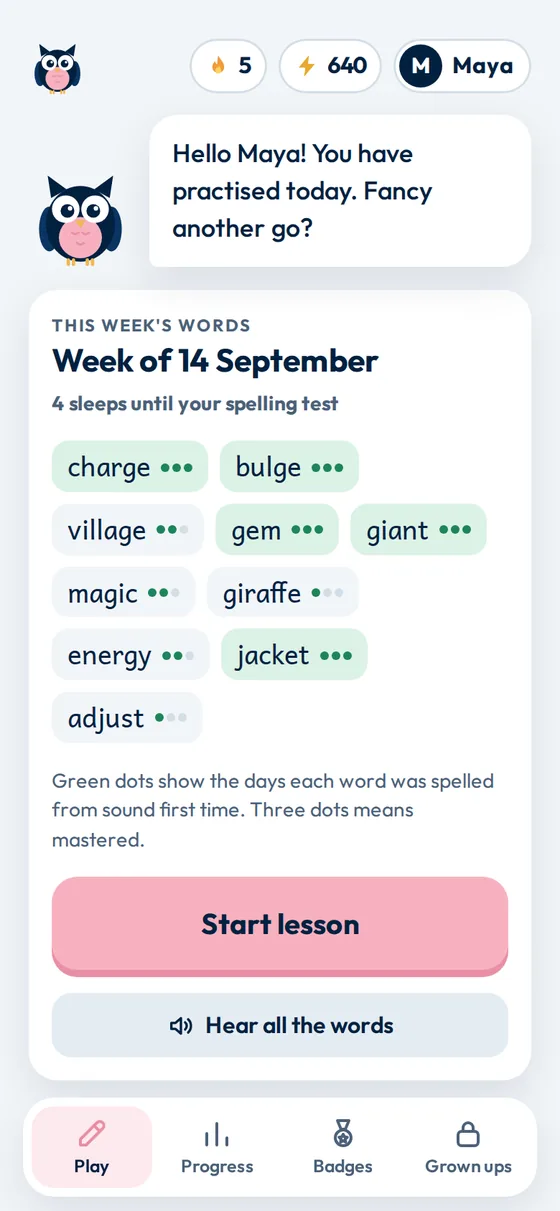
Children see a streak, XP and badges. Grown ups see days practised, words mastered and the last eight lessons with stars and scores. The dots next to each word show how many of the three mastery days that word has reached.
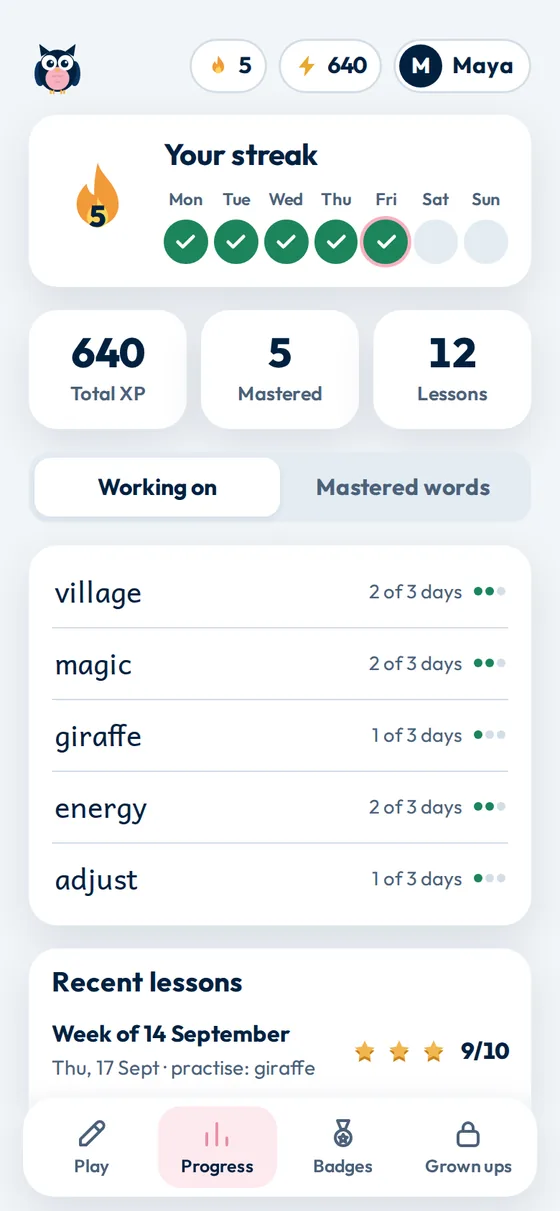
For grown ups
Safe, quiet and yours to delete.
Spelling Nest is run by one parent in the United Kingdom, not an advertising business. Everything below is set out in full in the privacy notice.
What we do not collect
No children's full names, dates of birth, photos, location or contact details. No adverts and no advertising trackers. One analytics service, only if you agree, and never given your child's words or name. Words are read aloud by your own device's built in voice, so what your child hears never leaves the device.
What we do collect
Your email address for the sign in link, your child's first name or nickname and school year, the word lists you add, and lesson results shown as XP, streaks and mastered words. We also count anonymous usage events so we can see which parts of the app are used. Read the privacy notice.

It started with one child in this house who would do almost anything rather than sit down and write his spellings out three times. One person builds it, answers the emails and writes everything on this site.
Who makes Spelling Nest · Questions parents ask · Instagram · Facebook · info@spellingnest.co.uk
Questions
The things parents ask first.
Who is it for?
Primary school children, roughly ages 5 to 11, from Reception to Year 6. It suits any child who gets a spelling list to learn at home.
Is there an app to install?
No. Spelling Nest opens in a browser on a phone, tablet or laptop. If you want it to feel like an app, use your browser's "Add to home screen" option and it will open full screen from an icon.
How long should my child play?
One lesson a day is plenty. A lesson is six to twelve questions and usually takes under ten minutes. Practice counts towards the streak on any day a lesson is finished.
How do this week's words get in?
A grown up types or pastes them into the Grown ups area. The list is cleaned up automatically, so you can paste straight from a message or a photo caption without tidying it first.
Does it follow the national curriculum?
Spelling Nest does not set the words. It practises the list your child's school sends home, so it matches whatever they are being taught that week. Every new profile starts with one example list so you can try it before your next list arrives.
Can I add more than one child?
Yes. Each child gets their own profile, their own word lists and their own progress, badges and streak, all under one grown up sign in.
Does my child need to type?
No. Every answer is given by tapping letter tiles. Spelling Nest never opens a keyboard for an answer, so spelling is tested rather than typing.
What happens when my child gets stuck?
On a Listen and spell question, Kit the owl steps in without being asked: first a slow replay with each letter group lighting up, then the first letter, then the number of letters and where the tricky part sits. Words that were helped still count for XP, but not towards mastery.
Does it work offline?
No. Spelling Nest needs an internet connection so that progress is saved to your account and is there on every device your family uses.
How do I sign in?
With your email address. We send you a link that signs you in, so there is no password to remember or reset. Your child never needs an email address of their own.
What does it cost?
Fourteen days free, then £3 a month or £20 for the year, which saves you £16. That covers every child in your family, not one child each.
Your card details are taken when you start, and nothing is charged for fourteen days. We email you before the first payment is due. Cancel at any point in those fourteen days and you pay nothing.
If you cancel later, practice carries on to the end of the period you have paid for. After that your word lists and progress stay exactly where they are and the lessons stop. Nothing is ever deleted.
How do I delete our data?
Open Grown ups and choose to delete all of your family's data. That removes your sign in account and email address, the children's profiles, the word lists and all progress, and it stops any subscription at the same time. You do not need to email us.
The one thing kept is the record of a payment, with your name no longer attached to it, because tax law requires us to hold it.
Give Friday morning a calmer feel.
Add this week's list, hand over the tablet, and see what has stuck before the test rather than after it.